Pages

Showing posts with label Electronic Organization. Show all posts

Monday, May 9, 2011

Unsubscribe For Summer

The weather is getting warmer. I'm not sure about where you are but here we had an especially warm weekend. It almost felt like summer. And what happens in summer is that we migrate outside, away from the computer and toward the pool. So when you do take a few minutes to return to your email wouldn't it be nice if you didn't have to go through 30 emails that you are just going to delete?


Take some time this week to unsubscribe from a few of those emails you find yourself deleting without opening.  Maybe it's a store that used to be your favorite. Or an organization you gave a donation to once, three years ago. Or a newsletter you aren't sure how you got subscribed on.  Before you hit DELETE next time you open your email, go through those emails and click the unsubscribe link at the bottom.  Clear your inbox just a little bit for summer.

Remember... if an email is from an unknown source (i.e. SPAM) please DO NOT click any links on those. Simply mark as spam and delete. But if you know where it's from the unsubscribe link should be legitimate.

Now get outside!

Wednesday, March 23, 2011

Information Clutter

Organizers talk a lot about physical clutter.  The stuff that fills up the space in your home, car, desk, etc.  But there is something else we talk about that doesn't get as much notice most of the time... information clutter.

One source of information clutter is your email.  Buy something online and the next thing you know you're on 6 mailing lists for sister sites.  I get "helpful" emails from my bank, retailers, alumni clubs, the church, etc, etc, etc.  It's a lot.  I try to unsubscribe from those I don't truly want to read.

In fact, if you are looking to save a little money then removing the temptation of the "HUGE SALE 50% OFF EVERYTHING" email from all your favorite online retailers is a great place to start.

But my current source of information clutter is on my smart phone.


Today I got a Twitter direct message. Here's a list of all the ways I was notified of the message:
1. a text message from Twitter
2. a text message from Twitter through my "handsent" application
3. an email from Twitter to my gmail app
4. an email from Twitter via my "universal inbox"
5. a notification from my Twitter app
6. a notification from my TweetDeck app
7. a notification from my HootSuite app

Um, yeah... the message was not that important.  One of those would have been sufficient.  Two at most.  

So this afternoon I'll be updating my twitter settings to remove a few of those. I'll start with email & text notification since on my phone twitter can notify me directly I don't need those additional outlets. 

The point is, clearing all those notifications from my phone took me probably 1 minute.  Not much time.  But if I get 10 messages a day, that's 10 minutes of time just spent clearing something I've already read.  What clutter!

Where can you cut information clutter from your life?

Tuesday, March 8, 2011

Preparing for Someday

Sara over at Saving for Someday had an awesome post today that I just couldn't resist sharing with you.

So much of our lives are online these days, our bills, our networks, our blogs.  Would your spouse or family know what accounts you have and what action needs to be taken to access, close or otherwise deal with them?  At this point, I'm not sure mine would.  Mr. Brown would know where I keep my information but there's a lot that he just doesn't know, not because it's a secret but because on a daily basis he doesn't need to.  We have all the legal stuff done - wills, power of attorney, medical power of attorney & living will.  But it's time for both of us to make sure we have a plan for the rest of it. 

If you have already made some kind of kit to help your family, let us know!  I'd love to learn from all of you.

Monday, January 31, 2011

My Life In One Place


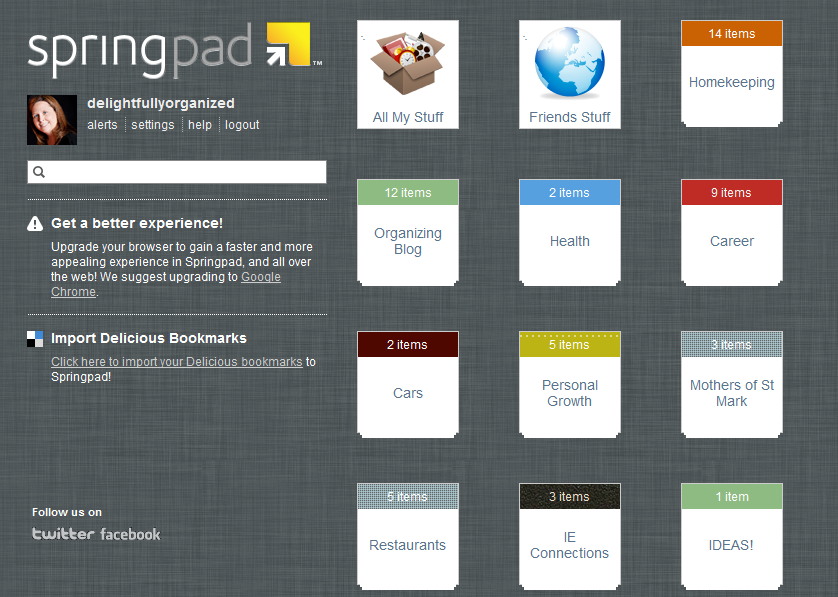
My newest favorite organizational tool is my Spring Pad account.  I've been using it for almost 2 months and I can't get enough of it.  The reason it took me so long to let you all in on it is because I wanted to make sure I really loved it before I raved about it.  But I do.  I really, really love it.

What is Spring Pad, you ask?  Only a totally awesome web tool and mobile app that you can use to track every thing you need for all sorts of different projects.

Here's a brief description from their company website:


Things I love About Spring Pad:
  • I can add items while at my computer and pull them up later on my phone.  This is amazing for shopping lists (make at home, use at the store).
  • I can add items from my phone and pull them up later at my computer.  This is perfect for when I see inspiration at the store and want to blog about it later.
  • There are only a few background choices - I don't feel compelled to waste spend hours designing a cool background for something that no one will ever see but me.  The designs they offer are simple, modern and attractive.
  • I can type in the name of a product or book and it will find an exact match for me.
  • It gives me alerts when I have deadlines coming up.
  • I can keep all of the areas of my life in one place - my family, my job, my blog, my other organizations.
  • I don't make notes in 10 different spots and lose the notes later. 
  • It's free!

***Note - Suzanne has not been compensated in any way, monitarily or otherwise, for this review.  This is my personal opinion of a product that I personally use. 

Monday, January 17, 2011

Plan to Plan

For some of you, this may be organizing overkill.  And if that's the case, feel free to skip on down to Friday's post.  But for the rest of you, this could be a great way to get started thinking about what you want to accomplish for the year.

This may sound crazy but I want you to plan the things you need to plan for the year. 

Wait, plan to plan?  Yep.  That's what I said!

Hear me out on this.  It shouldn't take you more than 5-10 minutes.  It's a really simple exercise but will get your brain moving.  This year you need to accomplish a few things and you want to accomplish a few things.  Well, I want you to accomplish both the needs and the wants.  And I want you to do it without stress.  For me, having a good checklist & plan for the things I am going to accomplish helps alleviate the stress.

So take the next few minutes and jot down a list of everything you need or want to accomplish this year that needs some additional planning.  It doesn't need to be a fancy list but put it somewhere that you can refer to it easily.  Here's my list:

  • Daughter's birthday party
  • Middle son's birthday party
  • Baby's 1st birthday party
  • Gifts to buy (& budget!) for babies on the way (several of my friends are expecting this year)
  • Mini-baby shower for friend
  • Trip to niece's graduation (along with gift)
  • Needed home improvements (items, possible vendors, prices, budgets)
  • Blog plan
  • Christmas gift ideas

That's it.  Those are the major events I need to have some kind of game plan for in 2011.  To come up with my list I looked at my calendar and noticed which things I had marked down that would require more than just an hour or two in which to prepare.

Now I can take those 9 things and start a notebook for them in Springpad (my current favorite application for organizing my ideas).  Then when I get a brainstorm I have a place to put it so the information is together.  And when I have a chunk of time to sit an plan, the information I've already thought of is there waiting for me.

Monday, February 15, 2010

28 Days To Living Organized - Day 15 - Email: Clear The Backlog


28 days to Living Organized

Email: Clear The Backlog


You've set out on a good course of tackling new messages as they come in and not letting them sit as a to-do list in your Inbox. 

Now it's time to deal with those many months (or years) of email you have to catch up on.  There are several ways to do this and anyway that gets your Inbox to Zero is appropriate.

One option (not my favorite) is to move all the old stuff to a "Old Stuff" file that you will defer until you have time to go through it.  This is not my favorite because I know that personally I would just leave that file there forever and never go through it.

A better option (in my opinion) is to simply tackle it with a few easy steps.

1. Sort by the "FROM" column.  This will make it easy to see ones that be quickly deleted.
2. Follow the 6 rules - Delete/Archive, Delegate, Respond, Defer, Do
3. Delete/Archive - this should be the easiest category.  If you've had them this long do you really need them anymore?  Probably not.  I expect most things will fall into this category
4. Delegate & Respond - Unless these emails are only a few days or weeks old it is probably well past the time to make any kind of response.  But there may be a few in there that still require you do respond or ask someone else to respond.
5. Defer - Um.... haven't you already done this long enough?  Forget this category and do one of the others
6. Do - A favorite here, right after Delete

It may take you awhile depending on how much backlog you have.  I suggest setting a timer or putting a few songs on a playlist and challenging yourself to get through as much as possible (all?) in 15-30 minutes.  If you don't get through all of it you can set aside another time later in the week.

Happy deleting!

Sunday, February 14, 2010

28 Days To Living Organized - Day 14 - Email: Do


28 days to Living Organized

Email: Do
 
"Do" email?  How is that different from Respond?
 
It's different in that you get off your rear-end and DO something.  Maybe you walk to a coworker's desk and have a conversation.  Maybe you fill out some paperwork and file/fax/mail it.  Maybe you make a phone call.
 
There are times (hard to believe, I know!) that our email requires us to do something other than sit at our computer.  If you receive an email that requires some action on your part and you can do it quickly and easily then simply get it done.
 
At this point, if you've taken one of the 6 actions on each item in your inbox that was newly received your inbox should be EMPTY!  But.... you still have the backlog to deal with.  We'll get to that tomorrow.

Saturday, February 13, 2010

28 Days To Living Organized - Day 13 - Email: Defer


28 Days to Living Organized

Email: Defer

Sometimes you get an email that you just can't respond to right now.  Maybe you don't know the answer.  Maybe it requires some kind of research or collaboration with others.  Maybe it's a non-urgent request that you need to get to sometime in the next 14 days.

It does happen sometimes.  Although it's usually better to respond right away there are times it's just not possible.  When that is the case, you can defer things. 

How do you defer?
* Make sure you make a tickler for yourself that you do need to do it!
     - put a task on your to-do list for the follow up steps you need to take or phone calls to make
     - move the email to a "Defer" folder that you check at the end of each day (or each week).  Set aside time each day (or week) to spend an hour working through the things in your "Defer" folder.

I firmly believe that this step is the that makes most of our inboxes so large.  We leave things there that we need to do something about but don't want to do it right now.

STOP THAT!

Two simple steps:
1. Defer as little as possible. 
2. What you must defer, set aside time to come back to. This is critical if you don't want to have a "defer" folder that is just as large as your inbox used to be.  You can't defer forever.  And if you are going to defer forever then go back up to step one and DELETE!

Friday, February 12, 2010

28 Days To Living Organized - Day 12 - Email: Respond


28 Days to Living Organized

Email: Respond

Scenario: You receive the following email on Sunday night.

To: You@Yourmail.com
From: Friendwithaquestion@theirmail.com
Re: Friday night

Hey You! I hope you are getting over that cold you had last week. How do you feel about getting together this Friday for drinks after work and then a movie?  It's been too long since we've seen each other.

~ Friend.

Multiple choice:
After reading this email you immediately:
a) respond with "Yes, that sounds great." or "Sorry, I'm busy Friday but can you do Saturday afternoon?"
b) Think "That sounds great but I need to check my calendar" and then proceed to check your calendar and respond on Monday
c) Think "That sounds great but I'm not sure if my spouse wants to go out to dinner on Friday so I need to check with them." Then ask your spouse, wait for a response until Wednesday and get back to your friend then
d) Think "Sounds good but I need to get to bed.  I'll respond tomorrow." and then send a response on Thursday apologizing for your late response and hoping your friend is still free.
e) Go to the next email in your inbox with plans to come back but don't respond until Saturday with a blushing "Sorry!"

If you do anything but a) or b) you need to rethink your habits.  I'm guilty of it.  Sometimes I "check" my email when I have no intention of actually "working" my email.  I'll read a note like this, plan to respond tomorrow and then get back to the person too late.  There are a few problems with this.
1. It is rude.  If this person is your friend, and even if they are not, they still deserve a response.
2. You might miss out on some great opportunities by procrastinating.
3. It's rude.  That was worth saying twice.

Even a quick response of "I need to check my calendar and I'll get back to you by Tuesday" is a good one.  And then... get back to them by Tuesday!  Wouldn't you be annoyed if you put a question out there and got no response? 

Emails like this fall into the easy Do It Now category.  Just respond.  Simple as that.  If you have to do more research or fact finding, that's fine.  But then put it on your to-do list and let the person know you got their message and are not ignoring them.

Thursday, February 11, 2010

28 Days To Living Organized - Day 11 - Email: Delegate


28 Days to Living Organized

Email: Delegate


I love the idea of delegating.  Doesn't everyone?  Giving something to someone else to take care of and taking work off of my own shoulders sounds wonderful.

But how many of us love the reality of it?  How many of us can really let go and entrust this sacred responsibility (or menial task) to another person over whom we have no control.

We worry: will they do it right?  will it get done on time?  maybe I should just walk them through how to do it first?

In some cases these concerns may be reasonable.  And if you really have reason to question if something will be done right or on time by someone else and it's important it be done right and on time then hesitate to delegate. 

But delegating can be a wonderful tool in the arsenal of all of us - whether in the workplace or at home.  In both situations allowing someone else to help us carry our burden will do two things - 1. it will free up some of our time and energy for things that are a better use of those resources and 2. it will allow the other person some experience in the process.

What should I delegate?
Routine activities that anyone can do.  In the home environment, maybe your children can take over some tasks, like having your teenager research vacation destination options or asking your elementary school aged children to respond to party invitations for themselves by calling their friend.

Anything that someone else is better at.  You love balancing the budget and filling out the tax forms (wierd, yes but some people are good at it).  Then don't delegate it.  But you are not so good at lawn maintenance.  Ask your spouse to make the follow-up arrangements with the lawn-care service.

Don't Delegate....
* Anything you can delete.  If something doesn't need to be done by you, it probably doesn't need to be done by anyone else.
* Anything for which you are critically invested in the outcome.  You are planning your daughter's 1st birthday party and want everything "just so."  This is not a good time to ask your spouse to pick out invitations or party favors.

How do I delegate?
We're talking about email here so the first and most obvious step is to forward the item to the appropriate person.  But don't just hit forward and send.  You need to lay the ground work:

* Ask the person to take care of this for you.  It sounds simple, but asking can go at lot farther in getting things done than instructing - unless you are that person's boss.
* Be very clear what you are asking.  Instead of "Bob, can you take care of this for me" say "Bob, Maryann needs a response on this by Thursday.  Can you review our timeline and get back to her with whether or not we'll be able to meet her needs?  Please copy me on your response."
* Delegate the task, not the method.  By giving something away you letting go of the idea that it will be done exactly as you would have done it.  Everyone has their own way.  Let the process go.
* If it's highly important or time sensitive, make yourself a tickler to follow-up.  This may be as simple as moving the email into a "waiting" folder or putting a reminder on your calendar to follow up with the person you delegated to.
* Delegate necessary decision-making power along with the task.  If you want your husband to be the person to take care of the lawn, let him be the one to decide how often things get done.
* Say Thank You!  Another simple thing that makes all the difference in the world.


Don't be afraid to delegate.  It can be very freeing.

Wednesday, February 10, 2010

28 Days To Living Organized - Day 10 - Email: Delete & Archive


28 Days to Living Organized

 
Email: Delete & Archive

 
Have you wrapped your mind around INBOX ZERO yet? It might take awhile to get used to the idea.

 
But the first action suggested is one everyone can do, even if you don't intend to have an empty inbox... Delete and Archive.

 
Delete
What should you be deleting? Junk mail and spam, obviously.  But what else?

  • Email forwards, jokes, and urban myths that you have no intention of passing on.  And I recommend not passing these on.  I love humor.  But unless you know the recipient will appreciate that email with 42 pictures of cats doing yoga poses then please, please don't pass it on.  Delete it.  Save your space for things that you really want to keep.
  • Sale "flyers" for items you don't plan to buy.  Yes, you love all of the items at your favorite store but your budget is tight right now and extra shopping isn't in the cards.  Just delete it.  Don't open it and tempt yourself with that too-good-to-pass-up 25% off coupon code.
  • "message received" emails.  Someone asks you for a document.  You send it.  They respond with the two word "thank you" email.  Get rid of it. 
  • Anything that is past its expiration - library hold notices, sales that ended, reminders for an event that happened yesterday, etc
  • Emails that have resolved themselves.  You were copied on an email to a group.  You haven't checked email in *gasp* 4 hours and in that time the other 3 ccs managed to come up with the answer and solve the issue. 

Archive
What should you archive?

This is trickier to answer because it will depend on each person and the purpose of your email account.  Keep things that you will need to reference in the future.  Sounds easy right?  Not so much.  It might include things like...

  • recipes - but once you've tried them either decide to delete because you didn't like it or put it in your real recipe file/book
  • feel-good emails - anything that makes you smile when you read it.  A sweet note from your hubby, a picture of your grandchild.  These are things you can refer back to when you are having a bad day.  But be choosy what you put in this category.  Make sure it's really special.
  • anything related to taxes - of course it's best to keep this information in some kind of backed-up electronic file and/or hard copy.  But keeping an email archive of it isn't a bad idea.  This includes receipts for electronic charitable donations
  • "CYA" emails.  You know the ones.  You're working on a big project and Jim Bob in another department decides to throw a wrench into the plans.  And you're lucky enough that he put it in writing in an email.  Keep this so that when things go wrong you have information that supports your theory on what happened.
  • Kudos emails.  These are the ones you want to pull out and review before your next performance review so you have proof you are doing a great job.
  • Backup documentation - anything relevant to a project you are working on that you wouldn't want to lose.

Of course, the categories of things you might want to archive is highly variable depending on your needs.

The real question is... How should I archive?

Do you like folders or just one big archive folder?  As Merlin Mann would tell you, keep it simple.  Don't make this complicated.  If you are using Microsoft Outlook you can assign a category to your emails.  You can then pull up all emails assigned to that category even if they are in the same "Archive" folder. 
Even easier, most email tools include a comprehensive search function.  It will search for your keyword(s) in all folders.  You're looking for the email about John's retirement party you can search on "retirement" and find it in two shakes of a lamb's tail.

If you insist on making folders, I again ask you to keep it simple!  And please, don't file by date.  You know you sent Suzy an email about how to retrieve voicemail but was that last week, last month or last year?  You probably can't remember.  Date files rarely work for most people.  Instead come up with a few broad categories. You can always use that search feature I mentioned above.

Tuesday, February 9, 2010

28 Days To Living Organized - Day 9 - Tackle E-Waste


28 days to Living Organized

Tackle E-Waste


We've worked through a space in your home.  We're living with that change.
We've de-cluttered a small area.
It's now time to move to the one area of everyone's life in which it's easy to overlook the cobwebs.... Our computers and on-line life.

What do I mean by E-Waste?  Electronic Waste.

You have it.  Emails in your inbox that are older than your children.  Facebook friends that you've met one time in real life and never bother to read a status update on.  Documents tucked neatly into folders that will never again see the light of your glowing computer monitor.

It's time to tackle these areas of our life.

I'm going to introduce you to a radical concept...
INBOX ZERO.

I cannot take credit for this idea.  It is the brainchild of Merlin Mann and has been around a few years.  But it is brilliant.  I can tell you from experience that it is a great way to live.

If you want complete information from Mr. Mann, check out this video of a presentation he gave back in 2007.

But here is the general idea...
Your inbox is not meant to be a catch-all.  Your in-box is not meant to be a to-do list. Your inbox is a temporary holding place for things coming in that need to be acted upon.  The equilibrium state of your inbox is empty.

Have you gasped in horror yet?  I did when I first heard it.  "But... but... but... I leave things in my inbox so I remember to work on them" I stammered.  And yet I will challenge you to do things differently.

When something comes into your inbox take one of the following actions:


It sounds so easy.  And once you start doing it it really is.

The goal is to "process to zero" every time you check your email.

Delete - be ruthless. Get rid of the junk as soon as you see it.  If you are copied on something that doesn't pertain to you, delete. If it's junk mail or spam or a newsletter you will never read, delete
Archive - there are some things you need to keep.  Maybe they are informational things that you will need to reference in the future.  Or maybe it's something you need to keep for cover-your-bases future needs.
Delegate - Are you the right person for this?  I believe you know within the first 10 seconds of reading an email if it really needs someone else to take action.  If it does, forward to the right person
Respond - Don't delay.  Just answer the question.  I can hear your objection already... I can't respond right now, I'm in the middle of something else.  I have a simple answer. If you are in the middle of something don't check your email!  Set aside a time for email.  Maybe it's the beginning and end of the day.  Maybe it's once every hour.  Don't stop in the middle of a project just because you got a pop-up about an email from your Great Aunt Millie.
Defer - If the response requires more than you can do in the time you have allotted for your email, or needs to be added to your priority list then defer it.  Create a DEFER folder and put things there.  Set aside a time on a regular basis (daily, weekly) to work through those items.
Do - These are things that are non-email actions.  They require you to get off your duff (or get out of your inbox) and DO something.  Do it.  If you can't do it right now (because it requires research or resources you don't have) then schedule it.

Over the next five days we'll work through each of these in more detail.

For now, just give it a start.  If you have 800 emails in your inbox today, don't worry about tackling all of those.  Just start from this moment and go forward.  Start with what came in today.  In a few days we'll work on getting back through those old ones.

I want using your email to be a delightful experience.

Read the rest of the email topics in this series!
Delete & Archive
Delegate
Respond
Defer
Do
Clear the Backlog
Declutter
Related Posts Plugin for WordPress, Blogger...