Pages

Showing posts with label Living Organized. Show all posts

Wednesday, April 6, 2011

50 Things To Do in 5 Minutes

No, I'm not suggesting you complete 50 tasks in 5 minutes.  This isn't some kind of scavenger hunt.  Rather it's 50 separate suggestions of things you can accomplish in 5 minutes. 


We all love dramatic before and after photos. It's amazing to see all we can accomplish with enough time and resources. But the reality is that most of our lives isn't made up of a day or a half day spent on organizing projects. Our lives are made up of 5 minutes of availability squeezed in between work, changing diapers, getting out the door, folding laundry and watching Grey's Anatomy. And that's how we live organized... by taking advantage of those moments.

So the next time you have 5 minutes, step away from Facebook (where you know you'll spend way more than 5 minutes getting sucked into it) and try to do one of these things to make your life a little simpler, your home a little more organized and your heart a little happier.

  1. Check Voicemail
  2. Schedule an annual doctor visit for yourself (& write it on the calendar)
  3. Delete 25 out-dated emails from your inbox
  4. File a small stack of papers
  5. Shred a few old bills
  6. Repair a loose button
  7. Throw out expired or old condiments from the fridge
  8. Clean out your purse (or at least one section of it!)
  9. Download pictures from your camera to your computer
  10. Purge a stack of magazines
  11. Clear out the ice cubes that have collected in the bottom of the freezer
  12. Toss expired coupons
  13. Go through one file of photos on your computer and delete the duplicates and bad ones
  14. Cleanse your garbage disposal by running it with a cut up lemon, baking soda and ice cubes
  15. Clear one clutter "hot spot"
  16. Refill the soap dispensers in all the bathrooms
  17. Update your voicemail message
  18. Plan your dinner menu for the week
  19. Choose 3 things from the closet that you'll never wear again and put them in the donate box
  20. Update your Netflix queue
  21. Write a love note to your spouse or significant other
  22. Transfer the $5 you didn't spend on coffee this morning from your checking account to your savings account
  23. Schedule e-cards for friends with birthdays this month
  24. Update your child's baby book
  25. Throw out expired medications
  26. Clear out the containers of last week's leftovers from the fridge
  27. Answer 1 important email that you keep putting off
  28. Uninstall 3 apps from your phone that you never use
  29. Add critical numbers to your cell phone contact list - poison control, local sheriff department, doctor, dentist and other key doctors
  30. Move your donation bag/box to the trunk of your car so you can drop it off on your next trip out
  31. Restock your diaper bag with wipes, diapers, diaper cream, a small snack & a bottle of water
  32. Check your coat closet for out of season items that need to be moved
  33. Research options for your next vacation
  34. Search for a new recipe to try with ingredients you already have on Epicurious or All Recipes
  35. Clean off your doorbell and exterior door knob to make the welcome warmer for visitors
  36. Put away 5 things that are not in their correct home
  37. Dust the television & electronic components
  38. Clean the kid fingerprints off your DVDs with Windex and a soft cloth
  39. Clear out the unmatched socks from your drawer
  40. Sweep out the side of the garage without a car in it
  41. Empty your shredder and the bottom tray on your 3-hole punch
  42. Empty the crumb tray on the toaster and wipe off the finger prints from the outside
  43. Remove 3 outdated documents from the front of the fridge
  44. Delete 3 recurring timers from your DVR of shows that you never watch or that have been canceled
  45. Microwave a bowl of water with lemon juice for 3 minutes to loosen gunk then wipe down the microwave with a damp cloth
  46. Clear out the unnecessary receipts gathered in your George Costanza wallet
  47. Send a quick "thinking of you" email to 3 friends
  48. Unscrew the filters from your faucets and soak in a small bowl of white vinegar to clear the mineral deposits
  49. Update your to-do list.  Eliminate one thing you don't really need to do and probably won't do anyway
  50. Read a Delightfully Organized blog post!

What do you do with 5 minutes to spare?

Monday, February 28, 2011

Are You Prepared?

Today's post is inspired by a reader and friend, Robin, who asked me a very good question: Do I have an emergency preparedness kit?

Sadly, the answer for me is NO!  I am woefully unprepared for any kind of natural disaster.  Of course, I have the luxury of living in an area that is not prone to most of the major disasters we see on the news - hurricanes, earthquakes and mudslides.  But we do get tornadoes here (though not usually in my town) and my family really should be prepared.

About 5 years ago I actually printed out a list of the things I would need for a kit but I never acted upon it.  It's still sitting in our family BOB (Big Ol' Book - a manual for our household) but has never been used.  It's probably about time I thought about that.  Especially with kids, if we did need to hunker down in our basement for a tornado those kids would go crazy without a few creature comforts (and so would I!).

The Federal Emergency Management Agency (FEMA) actually has a whole website devoted to helping Americans get prepared: http://www.ready.gov/.   Here's their list of suggested items for a kit:

  • Water, one gallon of water per person per day for at least three days, for drinking and sanitation
  • Food, at least a three-day supply of non-perishable food
  • Battery-powered or hand crank radio and a NOAA Weather Radio with tone alert and extra batteries for both
  • Flashlight and extra batteries
  • First aid kit
  • Whistle to signal for help
  • Dust mask, to help filter contaminated air and plastic sheeting and duct tape to shelter-in-place
  • Moist towelettes, garbage bags and plastic ties for personal sanitation
  • Wrench or pliers to turn off utilities
  • Can opener for food (if kit contains canned food)
  • Local maps
  • Cell phone with chargers, inverter or solar charger
Additional Items to Consider Adding to an Emergency Supply Kit:
  • Prescription medications and glasses
  • Infant formula and diapers
  • Pet food and extra water for your pet
  • Important family documents such as copies of insurance policies, identification and bank account records in a waterproof, portable container
  • Cash or traveler's checks and change
  • Important family documents such as copies of insurance policies, identification and bank account records in a waterproof, portable container. You can use the Emergency Financial First Aid Kit (EFFAK) - PDF, 277Kb) developed by Operation Hope, FEMA and Citizen Corps to help you organize your information.
  • Emergency reference material such as a first aid book or information from http://www.ready.gov/.
  • Sleeping bag or warm blanket for each person. Consider additional bedding if you live in a cold-weather climate.
  • Complete change of clothing including a long sleeved shirt, long pants and sturdy shoes. Consider additional clothing if you live in a cold-weather climate.
  • Household chlorine bleach and medicine dropper – When diluted nine parts water to one part bleach, bleach can be used as a disinfectant. Or in an emergency, you can use it to treat water by using 16 drops of regular household liquid bleach per gallon of water. Do not use scented, color safe or bleaches with added cleaners.
  • Fire Extinguisher
  • Matches in a waterproof container
  • Feminine supplies and personal hygiene items
  • Mess kits, paper cups, plates and plastic utensils, paper towels
  • Paper and pencil
  • Books, games, puzzles or other activities for children

It's a great list actually!  And one we should all be working on assembling for our homes.  Of course another key piece is adding a tickler to your calendar to check the kit at least once a year (maybe when you change the clocks?) to rotate out food and other products that might expire or lose their effectiveness.
 
I'm adding this to my to-do list for this spring.  Once I have a kit assembled I'll be back to share it with all of you.
 
Now it's your turn?  Do you have a kit?  If so, let us know!  Share a link to your blog post about it or share a picture on Facebook!  We want to know how you are preparing!

Wednesday, February 23, 2011

So Much More Than Good Enough

This post is for the women out there who've ever felt "less than" because of something they've seen on a blog.

Have you ever read a blog post and thought, "Oh, that's gorgeous. What a great idea! Too bad I don't have time for that!"?  What, you just read one of those this morning?  I thought so.

If you've wandered around the blog world long enough you've seen all make and manner of wonderfully creative ideas.  Women are out there writing about food, home decor, crafting and every manner of amazing ideas you can think of (or couldn't think of, as the case may be).

These are women who hit the thrift stores and estate sales.  They own cricuts and silhouettes.  They bake from scratch and grind their wheat into flour for home baked breads.  They are homeschooling their children while sewing awesome blankets to sell on etsy. They are, simply put, amazing.

You know what... I'm not one of those women. 
* I like to think I could be crafty but the closest I get to creative is picking out a wall color from a swatch.
* I have illusions delusions of grand sewing skills but the last time my sewing machine got use is when my awesome mom made my daughter's Halloween costume.
* I want to scrapbook or digi-scrap or something with the word scrap in it, but the nearest I come is scrapping plans for a home cooked dinner when one of my little ones comes down with a nasty virus.
* I tried baking my own bread but the high altitude in Colorado wouldn't let it turn out right (at least that's what I tell myself) so if I want something "home baked" I buy frozen loaves.
* The last (and first) time I attempted to give something in my home a shabby-chic weathered look it just looked, well, shabby.

And you want to know the real secret... neither are any of those awesome bloggers we all admire. They each have their strengths and that's what they write about. That may not be your strength. And that's okay.


I still haven't found one who is ALL of those things.  Bloggers write about what they know best.  Otherwise you wouldn't read them!  And that's the beauty of the blog world.  You can find the best of the best in all kinds of areas.

Please, please, please do not measure yourself against others.  Take the talents others have to share and fit them into your life as best you can, and as much as you want to.  You are amazing just the way you are.  You're out there living a life - working (whether at home or in an office), taking care of family (kids, pets, parents & spouses), and trying to find your own patch of peace in this world.  Give yourself the grace to know that you are good enough - more so, even.

Be kind to yourself.  If your organizing projects don't include cute handmade tags that color coordinate with the color of your towels, don't worry.  If your organizing feels more like being glad your kids at least got the towels in the right closet on the right shelf then your doing just fine. 

Here at Delightfully Organized my goal is to give you practical examples of how everyone can enhance their life by making things just a bit more simple.  The goal of organizing isn't to impress your friends, it's to make your life easier.  Stick around and let me help you do just that.

Wednesday, February 9, 2011

Time In A Bottle


As a culture we here in the US are a wee bit obsessed with time. We talk about it all the time a lot. See what I just did there? My first instinct was to use a "time phrase."

What are some of the ways we talk about time:
  • I don't have enough time.
  • That will take too much time
  • Time well spent
  • Time's up!
  • All the time
  • Is it time to go home yet?
  • Take your time
  • Time flies
  • Most wonderful time of the year
  • Having a good time
  • Big-time
  • Time's a-wastin'
  • It's about time!
  • Next time
  • Been a long time coming
  • Pass the time

Even our favorite sporting events are centered around time. Football, hockey, basketball, and soccer all have a clock. And while it's true that our National Pastime, Baseball, is a clock-less sport, interest in baseball has been eclipsed by football viewing, as evidenced by the record numbers of viewers for last week's Super Bowl XLV.

Have we lost our ability to savor moments and events like a long baseball game? And what about the double-header. Anyone been to TWO major league baseball games in the same day lately? Not likely. Who has the time to give up an entire day to enjoy the sunshine, a cold beverage, a few hot dogs, and some time spent with friends or loved ones? That is unthinkable for most of us. There's so much to do! 

And yet, we can't make more time. We only get what there is. Yes, it does vary by a few minutes over the years (thus leading to leap years) but overall, we get 525,600 minutes each year to live our lives (if you've seen the musical Rent you already knew that :-) )

I had my first revelation about time in college. Like other student I was perpetually rushing around and cramming in too much studying/work/classes/partying into each day. But one night I sat reading near a group of students studying together and overheard a guy said that he needed "another hour in the day."  It struck me then, like a bolt of lightening a whisper from God, that we don't NEED more time in the day.  If we needed more time in the day He would have given us more. What we need to do is use the time we have been given in the best way possible. And be grateful for those 24 hours and the fact that more is not expected of us than what we can accomplish in them.

My second revelation about time came about 10 years ago. I was dating a guy and he had some friends visiting Chicago, where we both lived, from out of town. The plan was to spend the weekend with them site-seeing and dining and just having fun. That Saturday morning I didn't put on my watch because I wasn't the one leading the itinerary. And I wasn't the driver. I just had to enjoy the days and go when everyone decided it was time to move on to the next activity. And you know what... it was LIBERATING! I didn't worry about the time. If lunch took 2 hours it didn't matter, because there was no where else to be but where we were and no one else to be with but those sitting next to us. 

That was in 2000. I never put my watch back on. Six years ago Mr. Brown gave me a beautiful watch as a birthday present. I love it, I really do. I tried to wear it. That lasted about a week. Sadly (because he put so much thought into picking it out) it sits in my jewelry drawer untouched with dead batteries. I don't wear it for two reasons:
1. I have a clock available to me and nearly every minute of the day. There's one on my computer, in my car, on my cell phone, in the office at work, on the walls at home, on my stove, on my microwave and next to my bed. I don't need any more!.
2. As much as I use all those clocks, I don't like the symbolism of actually wearing a time-piece on my person. For me, it feels a bit like an anchor. I feel compelled to check it and let it dictate my time. And I want to be able to savor moments instead of looking ahead to what's next and making sure I'm on schedule.

All this is not to say that I don't keep a calendar or a schedule. I certainly do. But when life permits, I thoroughly enjoy ignoring the clocks.

So, the next time you feel like there isn't enough time to get organized, remember that organizing isn't about time. It's about life. Being able to enjoy each moment because you aren't stressed over what you should be doing is the goal. And one great way to achieve that is to live in such a way that your stuff doesn't consume your time - the people who matter to you do.

There are a lot of organizers out there who will promise to help you "get organized in a day/weekend/week/month/year."  But in my opinion, organized isn't something you "get" in a set amount of time - it's a way to live from one moment to the next.

Monday, January 31, 2011

My Life In One Place


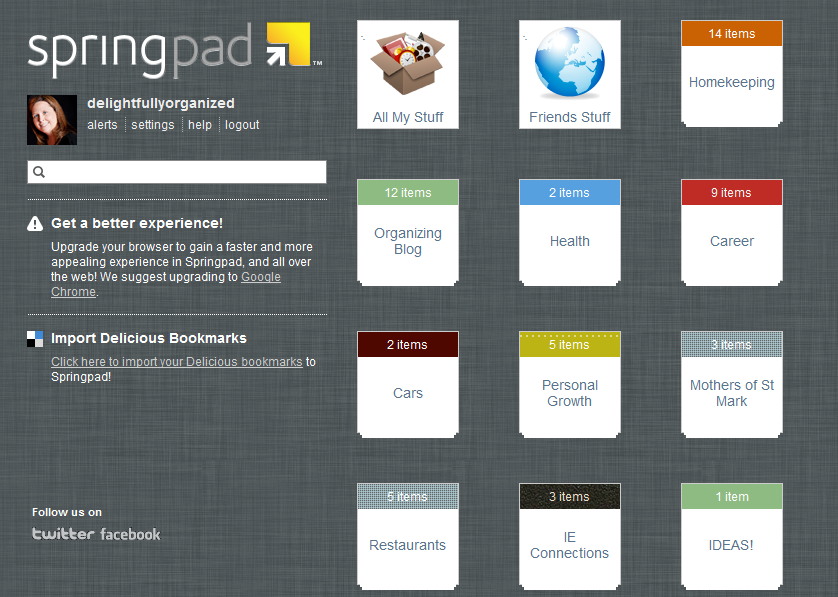
My newest favorite organizational tool is my Spring Pad account.  I've been using it for almost 2 months and I can't get enough of it.  The reason it took me so long to let you all in on it is because I wanted to make sure I really loved it before I raved about it.  But I do.  I really, really love it.

What is Spring Pad, you ask?  Only a totally awesome web tool and mobile app that you can use to track every thing you need for all sorts of different projects.

Here's a brief description from their company website:


Things I love About Spring Pad:
  • I can add items while at my computer and pull them up later on my phone.  This is amazing for shopping lists (make at home, use at the store).
  • I can add items from my phone and pull them up later at my computer.  This is perfect for when I see inspiration at the store and want to blog about it later.
  • There are only a few background choices - I don't feel compelled to waste spend hours designing a cool background for something that no one will ever see but me.  The designs they offer are simple, modern and attractive.
  • I can type in the name of a product or book and it will find an exact match for me.
  • It gives me alerts when I have deadlines coming up.
  • I can keep all of the areas of my life in one place - my family, my job, my blog, my other organizations.
  • I don't make notes in 10 different spots and lose the notes later. 
  • It's free!

***Note - Suzanne has not been compensated in any way, monitarily or otherwise, for this review.  This is my personal opinion of a product that I personally use. 

Tuesday, January 25, 2011

What's your organizing personality?

We all have an organizing personality.  It's the way we approach an organizing project and the way we walk away from it.  Here's my take on the different attitudes people have when taking on a project.  I bet you'll see yourself in a few of them but you'll know which is your strongest personality.

Not-Enough-Action Jackson
This person has big ideas and the house full of supplies to prove it. He starts a lot of projects. He gets an idea, rushes to the store to get supplies and can't wait to get started. But the bags of supplies sit in the car unopened. Or if they make it into the house, the project gets started and he is super excited. But ¼ of the way into the project he realizes he forgot one item she really needed or he encounters a situation he didn’t plan on. He will then “take a break” to get the item or assess the issue. However, he never returns to actually complete the project. His house/craft room/garage is full of supplies for 101 projects that he will probably never finish.

Close-Only-Counts-In-Horseshoes-And-Hand-Grenades Renee
This person works diligently on a project until she sees actual progress. Once the pieces start to fall into place she gets so excited about how much better it is than when we started. And she stops. The job is 90% complete but she still needs to do those last few things to actually cross it off her to-do list. It may be that the accumulated trash or donation boxes sit in the project area waiting to be disposed of for weeks, or she get the entire closet organization system put into place except that one last rod that she needs to pull out the step ladder to put into place. Her projects look good. Her friends are (mostly) impressed. But there is always a remnant or two of "I still need to" hanging around making her feel guilty. She never gets to feel complete about the project and those remnants only create another clutter issue because she can’t put them away because her self-image says she’ll get to it “someday.”

Pie-In-The-Sky Kai
This person loves coming up with big ideas. He has a solution to every organizational project you can think of. But when the rubber meets the road his butt hits the couch. He doesn’t have project supplies sitting around but he may have a binder or basket full of ideas pulled out of magazines. And his web browser probably has 87 favorites in their "ideas" folder. He WANTS to be organized. He wants to want to do the work. But he doesn’t do it. It may be a lack of time or money or it may be fear that his reality in completing the project won't match his expectations. This person is a close cousin of CLWEA-Malone.

Can’t-Leave-Well-Enough-Alone Malone
For this person, no job is ever complete. Not because there are last-minute things that didn't get taken care of like the NEA-Jackson but because he, well, just can't leave well enough alone. When you stop by his person's house his first comment is to ask you to "excuse the mess" of their "unfinished projects" and you look around and scratch your head because everything looks great. For this person there is always one more tweak to make, one more cool accessory to add, one more way to make it “just right”. He can never enjoy the fruits of his labor for a moment or two.

If-I-Say-It-It’ll-Be-So Jo
This person thinks she is organized. She has a closet full of baskets and bins full of things. But looks can be deceiving and she couldn't actually tell you what is in each basket. As a result she owns 47 pairs of her favorite pair of scissors because she can never find the ones she was looking for. When she gets something new she puts it in a place that “makes sense” but then forgets why that place made so much sense in the first place and can't find it again when she needs to retrieve it.

I-Think-I-Can-I-KNOW-I-Can Diane
This person is the friend you want to emulate. She has a list (written or mental) of projects she would like to accomplish. Before tackling a project she assesses what is needed to finish it, how much it will cost, and about how long it will take. She tries to get everything she’ll need beforehand but she’s realistic. She knows there will be at least 1 trip to the hardware, home improvement or big-box store for each day that the project takes and she knows it will probably take her 50% longer than she originally anticipated. And she is okay with that. When she runs into an issue, she hops online to look for a solution, heads to the store to get the item she is missing or she calls in a spouse or a handyman to help with the task that is just a little too hard to do alone. When the job is "finished" she takes a small break to enjoy her handiwork and then gets back to work finishing up the little details - hauling out the trash, making a trip to the donation center, putting things back in place, returning her tools to the toolbox and returning unused supplies to the store for a refund. Then she sits back with a glass of her favorite wine/coffee/soft drink/water and enjoys the feeling of accomplishment before thinking about what's next on her list.

So, which one are you?

Monday, January 17, 2011

Plan to Plan

For some of you, this may be organizing overkill.  And if that's the case, feel free to skip on down to Friday's post.  But for the rest of you, this could be a great way to get started thinking about what you want to accomplish for the year.

This may sound crazy but I want you to plan the things you need to plan for the year. 

Wait, plan to plan?  Yep.  That's what I said!

Hear me out on this.  It shouldn't take you more than 5-10 minutes.  It's a really simple exercise but will get your brain moving.  This year you need to accomplish a few things and you want to accomplish a few things.  Well, I want you to accomplish both the needs and the wants.  And I want you to do it without stress.  For me, having a good checklist & plan for the things I am going to accomplish helps alleviate the stress.

So take the next few minutes and jot down a list of everything you need or want to accomplish this year that needs some additional planning.  It doesn't need to be a fancy list but put it somewhere that you can refer to it easily.  Here's my list:

  • Daughter's birthday party
  • Middle son's birthday party
  • Baby's 1st birthday party
  • Gifts to buy (& budget!) for babies on the way (several of my friends are expecting this year)
  • Mini-baby shower for friend
  • Trip to niece's graduation (along with gift)
  • Needed home improvements (items, possible vendors, prices, budgets)
  • Blog plan
  • Christmas gift ideas

That's it.  Those are the major events I need to have some kind of game plan for in 2011.  To come up with my list I looked at my calendar and noticed which things I had marked down that would require more than just an hour or two in which to prepare.

Now I can take those 9 things and start a notebook for them in Springpad (my current favorite application for organizing my ideas).  Then when I get a brainstorm I have a place to put it so the information is together.  And when I have a chunk of time to sit an plan, the information I've already thought of is there waiting for me.

Thursday, January 13, 2011

Quick Tip Thursday: Never Be Empty Handed

One of the most effective ways I've found to keep some semblance of order in my home (and with 3 kids that's not always easy) is to never leave a room empty handed.

Now, sometimes my hands are full of kids. 

But if I'm leaving any room, for any reason, and I don't have a child or two in my arms then I'm carrying something else that needs to be re-homed.  Maybe it's a dirty glass that gets put in the dishwasher, some forlorn stickers that need to make their way to the trash, a child's coat that needs to be hung up, or a basket of clean, folded laundry that needs to make its way to the bedroom.

It can be large or small.  But this small simple act of moving one (or more!) item out of it's misplaced position to the right spot will do wonders for keeping things a little less cluttered on a day-to-day basis.

Still looking for a New Year's Resolution - Never Leave A Room Empty Handed just might be it.

Wednesday, January 12, 2011

Refresh & Renew

Now that I've had a week and a half in this new year, I've been able to get my plans together.  I don't know about you but Jan 1 is never a very good day for me to make a radical life change.  It's just too chaotic.  Sometimes the holiday decorations are still up making it hard to feel like it's a new year.  Sometimes I've been up much to late the night before making it hard to stick to anything too out of my normal routine.  And it always feels like too much pressure to be perfect from the get-go.

But having a few days under my belt into the year allows me to gain perspective and think about goals for the year.  And I've been able to plan what topics we'll cover this year here on the blog.  Things to look forward to are:

Loving your spaces
Making your own Luck
Spring Cleaning
Vacations & Travel
Lazy Days Organizing
Autumn changes
Holiday preparation
Being Thankful
and
an Organizing Advent

Sounds like fun, right?  Well, I'm excited about it.

But before we can get into the meat and potatoes it's always nice to clear the slate a bit.  Think of these next 2 weeks as your palate cleansing sorbet before we dive into the main dish.  Through the end of the month, I'm going to walk you through some simple tasks that will help you prepare your space and your brain for the challenges of living more organized.

Saturday, January 1, 2011

Welcome To Your Life

There's an overabundance of talk today about starting fresh.  Everyone is talking about their resolutions, things they want to improve, and just generally starting anew.  The dawn of a new year tends to bring out our most basic instinct to get our proverbial house in order.  And I am no different.

But while everything in my being is telling me to get cracking on achieving every goal I've had for myself since I was 13, my better judgement is tempering my thoughts today.  Let me tell you that I haven't made any resolutions.  Would I like to lose weight, make more money, be more organized, etc, etc like everyone else?  Of course!  But years of New Years have taught me that I'm not a very good resolution-keeper. 

Instead I'm going to spend some time today making a list of achievable tasks that I actually believe I can accomplish this year.  This are things on my to-do list that can be checked off - not the perennial "lose 20 lbs" - more along the lines of "upgrade bathroom light fixture."

So what am I doing today?  Today is a family day.  But in between time with the kids and watching bowl games I am working on the following "fresh start" actions:

* Clear out my voicemail - home & mobile
* Change the filter in the water filtration system
* Download pictures off my camera & erase them from the memory card
* Review my DVR timers and weed out those I don't watch
* Finish my Christmas Thank-You cards
* Put away the last of the Christmas decorations (there are a handful of things lingering that didn't make it in the first round of picking up)
* Make my 2011 check list (a list of do-able actions, not unobtainable goals)

And if I get to it... clean out my email inbox & contact lists.

How will you be spending this first day of the year?  If the thought of trying to become a new person in one day is daunting (it is for me) then try not to think of it as a new start.  Think of it as your life - just one more day in your life that you are trying to make as good as it can be.

Thursday, February 18, 2010

28 Days To Living Organized - Day 18 - Time: To-Do List


28 Days to Living Organized

Time: To-Do List

We’ve talked about space and we’ve talked about email. Now we’re going to talk about organizing your TIME.


Have you ever….

• Made an appointment but forgot to write it down so you missed it?
• Committed to an activity that you didn’t make it to?
• Been late to an event?
• Been too early to an event?
• Left home without everything you needed for what you were doing?
• Skipped a few days of housework and ended up feeling overwhelmed by the results?

I’m guessing you’ve done at least one of these. I’m guessing almost everyone has done all of these at least once.

I want to talk today about your to-do list. I believe there are three keys to having a successful, useful to-do list. If you will do these three things I guarantee you will accomplish your goals – both big and small.

Write It
Read It
Do It

Brilliant, isn’t it? And yet despite the simplicity and obviousness of these three steps, how many times have you skipped one or more of them and then wondered why you weren’t getting things done.

1. Write It - Have a to-do list in written form.  Thiss can be done in a number of ways. You can use a pad of paper and pen, make a spreadsheet-style list, use some fancy notebook feature on your cell phone or you can use one of the many online options such as Ta-da Lists or Remember The Milk.

2. Read It - Refer to it regularly. Some of you are like me. You write it down then lose what you wrote it on and so you make a new one. In the meantime, you try to remember your items in your head. Don’t do that. Put it somewhere you can see while you are at home or away. And look at it at least every day – if not more than once a day.

3. Do It - When you look at it… DO SOMETHING. Making lists is fun for organizing geeks like me. But it is so much more satisfying to actually get things accomplished than it is to just write about what you wish you could get done.

In a few weeks, look for a follow-up for more advanced to-do list techniques. But for now remember this:

Write It
Read It
Do It

Wednesday, February 17, 2010

28 Days To Living Organized - Day 17 - Check & Adjust


28 Days to Living Organized

Check & Adjust
 
 
It's time to come back to your original organization project from earlier this month and figure out how it is going.  It's time to make any necessary adjustments.
 
So... you've been living with the new solution/space/routine for 10 days now.  How does it feel?  Is it working?  Are there glitches that you didn't forsee.  To do a quick assessment, ask yourself (and your family members) these questions:
 
1. Is {INSERT PROBLEM} still a problem in our home?  If you answer No to this then hats off to you!  If you answer yes then let's keep going.
2. Have any positive changes been made?  If yes, what are they?
3. What areas are still a problem?
4. Did my original plan not work (or only partly work) because it was not a good plan or because I didn't execute it?
4a. If it wasn't a good plan, it's time to think of a different solution
4b. If it wasn't executed you need to ask yourself why and address that.  It could be that you didn't carry it out because it was too hard or time consuming - if so, you probably need a new plan.  Or it could be that you just got busy doing other things.  If this is the case, you might just need to make it a priority.
 
I'll give you my assessment.  My problem was with clutter on the island in our kitchen.  Our solution was to create folders for the mail that tends to accumulate and put those folders into a nearby drawer.
 
The current result is that there is a folder for medical receipts (something I need to track separately from the regular bills) but the folders for the other bills has just not been created.  Why?  Because I just didn't do it.  It wasn't too hard or costly.  I just.didn't.do.it.  It was that simple.  So I don't really need a new plan, I just need to implement the one I've got.  And now that the health status in our home is back on the upswing I'll be working on that tonight.

Tuesday, February 16, 2010

28 Days To Living Organized - Day 16 - De-Clutter Day


28 days to Living Organized

De-Clutter Day

On our last de-clutter day we cleared a space.  Today we're going to stop the bleeding.

I mean let's keep the clutter from coming in the door - both your physical door and your electronic door.

Follow these simple steps:
1. Opt out of pre-approved credit card offers.  This is the official site.  Yes, you do have to put in your social security number.  This is legitimate.  This will eliminate most "You're Pre-approved!" offers from your mailbox.  The exception is that your current creditors can still send you things.

2. Stop the phone calls.  This doesn't make physical clutter in your life but it sure is annoying and can suck your time.  The National Do Not Call Registry will block those annoying telemarketers.  Know that some groups, like charitable organizations, are excempt.

3. Cancel your catalogs.  You ordered something from "Cute-Stuff-That-You-Probably-Don't-Need-Anyway Corporation" three years ago and you still get their catalogs.  Next time one arrives, call and ask to be removed from their mailing list.  They should be accomodating since they don't want to spend money on postage to someone who isn't going buy anything.

4. Eliminate the "fluff" mail.  I'm talking about e-mail here.  Specifically e-mail that you have no use for.  Not real junk mail - there are spam filters for that.  I mean newsletters you subscribed to but never read, sale "flyers" from companies you ordered from years ago.  All of them should have an "opt-out" or "unsubscribe" option at the bottom of the email.  Use it
A word of warning... don't select "unsubscribe" on an e-mail from an unfamiliar source.  Those can lead you to unsavory websites.  And if you are not sure if the link is okay, you can find out what it really is.  Just because it says http://www.cnn.com/ doesn't mean it isn't sending you to horrible-site-that-will-give-you-a-virus.come
To check, hover over the link with your mouse.  It will very likely give you a pop-up with the actual link.  If it says www.amazooon.com instead of www.amazon.com then it's probably a scam.


It's a lot easier to manage what's really important when you don't have to sort through the things you don't need.

Monday, February 15, 2010

28 Days To Living Organized - Day 15 - Email: Clear The Backlog


28 days to Living Organized

Email: Clear The Backlog


You've set out on a good course of tackling new messages as they come in and not letting them sit as a to-do list in your Inbox. 

Now it's time to deal with those many months (or years) of email you have to catch up on.  There are several ways to do this and anyway that gets your Inbox to Zero is appropriate.

One option (not my favorite) is to move all the old stuff to a "Old Stuff" file that you will defer until you have time to go through it.  This is not my favorite because I know that personally I would just leave that file there forever and never go through it.

A better option (in my opinion) is to simply tackle it with a few easy steps.

1. Sort by the "FROM" column.  This will make it easy to see ones that be quickly deleted.
2. Follow the 6 rules - Delete/Archive, Delegate, Respond, Defer, Do
3. Delete/Archive - this should be the easiest category.  If you've had them this long do you really need them anymore?  Probably not.  I expect most things will fall into this category
4. Delegate & Respond - Unless these emails are only a few days or weeks old it is probably well past the time to make any kind of response.  But there may be a few in there that still require you do respond or ask someone else to respond.
5. Defer - Um.... haven't you already done this long enough?  Forget this category and do one of the others
6. Do - A favorite here, right after Delete

It may take you awhile depending on how much backlog you have.  I suggest setting a timer or putting a few songs on a playlist and challenging yourself to get through as much as possible (all?) in 15-30 minutes.  If you don't get through all of it you can set aside another time later in the week.

Happy deleting!

Sunday, February 14, 2010

28 Days To Living Organized - Day 14 - Email: Do


28 days to Living Organized

Email: Do
 
"Do" email?  How is that different from Respond?
 
It's different in that you get off your rear-end and DO something.  Maybe you walk to a coworker's desk and have a conversation.  Maybe you fill out some paperwork and file/fax/mail it.  Maybe you make a phone call.
 
There are times (hard to believe, I know!) that our email requires us to do something other than sit at our computer.  If you receive an email that requires some action on your part and you can do it quickly and easily then simply get it done.
 
At this point, if you've taken one of the 6 actions on each item in your inbox that was newly received your inbox should be EMPTY!  But.... you still have the backlog to deal with.  We'll get to that tomorrow.

Saturday, February 13, 2010

28 Days To Living Organized - Day 13 - Email: Defer


28 Days to Living Organized

Email: Defer

Sometimes you get an email that you just can't respond to right now.  Maybe you don't know the answer.  Maybe it requires some kind of research or collaboration with others.  Maybe it's a non-urgent request that you need to get to sometime in the next 14 days.

It does happen sometimes.  Although it's usually better to respond right away there are times it's just not possible.  When that is the case, you can defer things. 

How do you defer?
* Make sure you make a tickler for yourself that you do need to do it!
     - put a task on your to-do list for the follow up steps you need to take or phone calls to make
     - move the email to a "Defer" folder that you check at the end of each day (or each week).  Set aside time each day (or week) to spend an hour working through the things in your "Defer" folder.

I firmly believe that this step is the that makes most of our inboxes so large.  We leave things there that we need to do something about but don't want to do it right now.

STOP THAT!

Two simple steps:
1. Defer as little as possible. 
2. What you must defer, set aside time to come back to. This is critical if you don't want to have a "defer" folder that is just as large as your inbox used to be.  You can't defer forever.  And if you are going to defer forever then go back up to step one and DELETE!

Friday, February 12, 2010

28 Days To Living Organized - Day 12 - Email: Respond


28 Days to Living Organized

Email: Respond

Scenario: You receive the following email on Sunday night.

To: You@Yourmail.com
From: Friendwithaquestion@theirmail.com
Re: Friday night

Hey You! I hope you are getting over that cold you had last week. How do you feel about getting together this Friday for drinks after work and then a movie?  It's been too long since we've seen each other.

~ Friend.

Multiple choice:
After reading this email you immediately:
a) respond with "Yes, that sounds great." or "Sorry, I'm busy Friday but can you do Saturday afternoon?"
b) Think "That sounds great but I need to check my calendar" and then proceed to check your calendar and respond on Monday
c) Think "That sounds great but I'm not sure if my spouse wants to go out to dinner on Friday so I need to check with them." Then ask your spouse, wait for a response until Wednesday and get back to your friend then
d) Think "Sounds good but I need to get to bed.  I'll respond tomorrow." and then send a response on Thursday apologizing for your late response and hoping your friend is still free.
e) Go to the next email in your inbox with plans to come back but don't respond until Saturday with a blushing "Sorry!"

If you do anything but a) or b) you need to rethink your habits.  I'm guilty of it.  Sometimes I "check" my email when I have no intention of actually "working" my email.  I'll read a note like this, plan to respond tomorrow and then get back to the person too late.  There are a few problems with this.
1. It is rude.  If this person is your friend, and even if they are not, they still deserve a response.
2. You might miss out on some great opportunities by procrastinating.
3. It's rude.  That was worth saying twice.

Even a quick response of "I need to check my calendar and I'll get back to you by Tuesday" is a good one.  And then... get back to them by Tuesday!  Wouldn't you be annoyed if you put a question out there and got no response? 

Emails like this fall into the easy Do It Now category.  Just respond.  Simple as that.  If you have to do more research or fact finding, that's fine.  But then put it on your to-do list and let the person know you got their message and are not ignoring them.

Thursday, February 11, 2010

28 Days To Living Organized - Day 11 - Email: Delegate


28 Days to Living Organized

Email: Delegate


I love the idea of delegating.  Doesn't everyone?  Giving something to someone else to take care of and taking work off of my own shoulders sounds wonderful.

But how many of us love the reality of it?  How many of us can really let go and entrust this sacred responsibility (or menial task) to another person over whom we have no control.

We worry: will they do it right?  will it get done on time?  maybe I should just walk them through how to do it first?

In some cases these concerns may be reasonable.  And if you really have reason to question if something will be done right or on time by someone else and it's important it be done right and on time then hesitate to delegate. 

But delegating can be a wonderful tool in the arsenal of all of us - whether in the workplace or at home.  In both situations allowing someone else to help us carry our burden will do two things - 1. it will free up some of our time and energy for things that are a better use of those resources and 2. it will allow the other person some experience in the process.

What should I delegate?
Routine activities that anyone can do.  In the home environment, maybe your children can take over some tasks, like having your teenager research vacation destination options or asking your elementary school aged children to respond to party invitations for themselves by calling their friend.

Anything that someone else is better at.  You love balancing the budget and filling out the tax forms (wierd, yes but some people are good at it).  Then don't delegate it.  But you are not so good at lawn maintenance.  Ask your spouse to make the follow-up arrangements with the lawn-care service.

Don't Delegate....
* Anything you can delete.  If something doesn't need to be done by you, it probably doesn't need to be done by anyone else.
* Anything for which you are critically invested in the outcome.  You are planning your daughter's 1st birthday party and want everything "just so."  This is not a good time to ask your spouse to pick out invitations or party favors.

How do I delegate?
We're talking about email here so the first and most obvious step is to forward the item to the appropriate person.  But don't just hit forward and send.  You need to lay the ground work:

* Ask the person to take care of this for you.  It sounds simple, but asking can go at lot farther in getting things done than instructing - unless you are that person's boss.
* Be very clear what you are asking.  Instead of "Bob, can you take care of this for me" say "Bob, Maryann needs a response on this by Thursday.  Can you review our timeline and get back to her with whether or not we'll be able to meet her needs?  Please copy me on your response."
* Delegate the task, not the method.  By giving something away you letting go of the idea that it will be done exactly as you would have done it.  Everyone has their own way.  Let the process go.
* If it's highly important or time sensitive, make yourself a tickler to follow-up.  This may be as simple as moving the email into a "waiting" folder or putting a reminder on your calendar to follow up with the person you delegated to.
* Delegate necessary decision-making power along with the task.  If you want your husband to be the person to take care of the lawn, let him be the one to decide how often things get done.
* Say Thank You!  Another simple thing that makes all the difference in the world.


Don't be afraid to delegate.  It can be very freeing.

Wednesday, February 10, 2010

28 Days To Living Organized - Day 10 - Email: Delete & Archive


28 Days to Living Organized

 
Email: Delete & Archive

 
Have you wrapped your mind around INBOX ZERO yet? It might take awhile to get used to the idea.

 
But the first action suggested is one everyone can do, even if you don't intend to have an empty inbox... Delete and Archive.

 
Delete
What should you be deleting? Junk mail and spam, obviously.  But what else?

  • Email forwards, jokes, and urban myths that you have no intention of passing on.  And I recommend not passing these on.  I love humor.  But unless you know the recipient will appreciate that email with 42 pictures of cats doing yoga poses then please, please don't pass it on.  Delete it.  Save your space for things that you really want to keep.
  • Sale "flyers" for items you don't plan to buy.  Yes, you love all of the items at your favorite store but your budget is tight right now and extra shopping isn't in the cards.  Just delete it.  Don't open it and tempt yourself with that too-good-to-pass-up 25% off coupon code.
  • "message received" emails.  Someone asks you for a document.  You send it.  They respond with the two word "thank you" email.  Get rid of it. 
  • Anything that is past its expiration - library hold notices, sales that ended, reminders for an event that happened yesterday, etc
  • Emails that have resolved themselves.  You were copied on an email to a group.  You haven't checked email in *gasp* 4 hours and in that time the other 3 ccs managed to come up with the answer and solve the issue. 

Archive
What should you archive?

This is trickier to answer because it will depend on each person and the purpose of your email account.  Keep things that you will need to reference in the future.  Sounds easy right?  Not so much.  It might include things like...

  • recipes - but once you've tried them either decide to delete because you didn't like it or put it in your real recipe file/book
  • feel-good emails - anything that makes you smile when you read it.  A sweet note from your hubby, a picture of your grandchild.  These are things you can refer back to when you are having a bad day.  But be choosy what you put in this category.  Make sure it's really special.
  • anything related to taxes - of course it's best to keep this information in some kind of backed-up electronic file and/or hard copy.  But keeping an email archive of it isn't a bad idea.  This includes receipts for electronic charitable donations
  • "CYA" emails.  You know the ones.  You're working on a big project and Jim Bob in another department decides to throw a wrench into the plans.  And you're lucky enough that he put it in writing in an email.  Keep this so that when things go wrong you have information that supports your theory on what happened.
  • Kudos emails.  These are the ones you want to pull out and review before your next performance review so you have proof you are doing a great job.
  • Backup documentation - anything relevant to a project you are working on that you wouldn't want to lose.

Of course, the categories of things you might want to archive is highly variable depending on your needs.

The real question is... How should I archive?

Do you like folders or just one big archive folder?  As Merlin Mann would tell you, keep it simple.  Don't make this complicated.  If you are using Microsoft Outlook you can assign a category to your emails.  You can then pull up all emails assigned to that category even if they are in the same "Archive" folder. 
Even easier, most email tools include a comprehensive search function.  It will search for your keyword(s) in all folders.  You're looking for the email about John's retirement party you can search on "retirement" and find it in two shakes of a lamb's tail.

If you insist on making folders, I again ask you to keep it simple!  And please, don't file by date.  You know you sent Suzy an email about how to retrieve voicemail but was that last week, last month or last year?  You probably can't remember.  Date files rarely work for most people.  Instead come up with a few broad categories. You can always use that search feature I mentioned above.

Tuesday, February 9, 2010

28 Days To Living Organized - Day 9 - Tackle E-Waste


28 days to Living Organized

Tackle E-Waste


We've worked through a space in your home.  We're living with that change.
We've de-cluttered a small area.
It's now time to move to the one area of everyone's life in which it's easy to overlook the cobwebs.... Our computers and on-line life.

What do I mean by E-Waste?  Electronic Waste.

You have it.  Emails in your inbox that are older than your children.  Facebook friends that you've met one time in real life and never bother to read a status update on.  Documents tucked neatly into folders that will never again see the light of your glowing computer monitor.

It's time to tackle these areas of our life.

I'm going to introduce you to a radical concept...
INBOX ZERO.

I cannot take credit for this idea.  It is the brainchild of Merlin Mann and has been around a few years.  But it is brilliant.  I can tell you from experience that it is a great way to live.

If you want complete information from Mr. Mann, check out this video of a presentation he gave back in 2007.

But here is the general idea...
Your inbox is not meant to be a catch-all.  Your in-box is not meant to be a to-do list. Your inbox is a temporary holding place for things coming in that need to be acted upon.  The equilibrium state of your inbox is empty.

Have you gasped in horror yet?  I did when I first heard it.  "But... but... but... I leave things in my inbox so I remember to work on them" I stammered.  And yet I will challenge you to do things differently.

When something comes into your inbox take one of the following actions:


It sounds so easy.  And once you start doing it it really is.

The goal is to "process to zero" every time you check your email.

Delete - be ruthless. Get rid of the junk as soon as you see it.  If you are copied on something that doesn't pertain to you, delete. If it's junk mail or spam or a newsletter you will never read, delete
Archive - there are some things you need to keep.  Maybe they are informational things that you will need to reference in the future.  Or maybe it's something you need to keep for cover-your-bases future needs.
Delegate - Are you the right person for this?  I believe you know within the first 10 seconds of reading an email if it really needs someone else to take action.  If it does, forward to the right person
Respond - Don't delay.  Just answer the question.  I can hear your objection already... I can't respond right now, I'm in the middle of something else.  I have a simple answer. If you are in the middle of something don't check your email!  Set aside a time for email.  Maybe it's the beginning and end of the day.  Maybe it's once every hour.  Don't stop in the middle of a project just because you got a pop-up about an email from your Great Aunt Millie.
Defer - If the response requires more than you can do in the time you have allotted for your email, or needs to be added to your priority list then defer it.  Create a DEFER folder and put things there.  Set aside a time on a regular basis (daily, weekly) to work through those items.
Do - These are things that are non-email actions.  They require you to get off your duff (or get out of your inbox) and DO something.  Do it.  If you can't do it right now (because it requires research or resources you don't have) then schedule it.

Over the next five days we'll work through each of these in more detail.

For now, just give it a start.  If you have 800 emails in your inbox today, don't worry about tackling all of those.  Just start from this moment and go forward.  Start with what came in today.  In a few days we'll work on getting back through those old ones.

I want using your email to be a delightful experience.

Read the rest of the email topics in this series!
Delete & Archive
Delegate
Respond
Defer
Do
Clear the Backlog
Declutter
Related Posts Plugin for WordPress, Blogger...